from the bridgething app or this browser
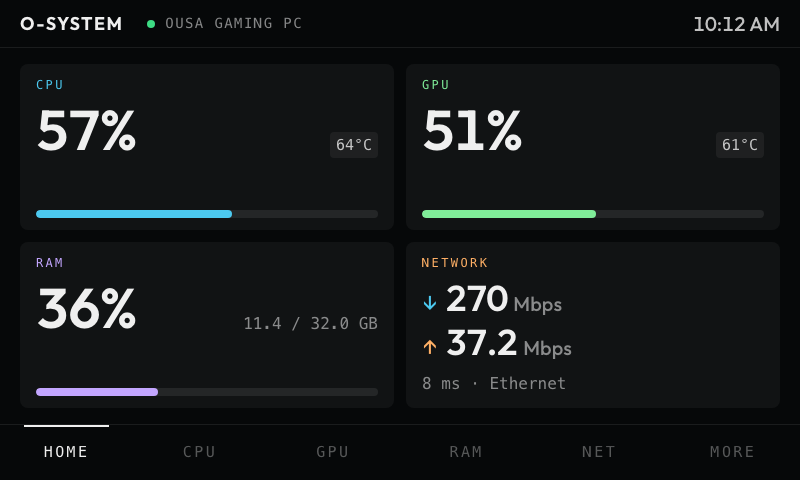
CPU, GPU, memory, network and storage for your machines, on the Car Thing.
native extension
this app runs code on your computer. it reported needing these permissions:
- run /usr/bin/vm_stat
- run /usr/sbin/sysctl
- run /usr/sbin/ioreg
- run /usr/sbin/netstat
- run /bin/ps
- run /usr/bin/pmset
- run /bin/df
- run /sbin/ping
- run /sbin/route
- run /usr/sbin/system_profiler
- run /usr/bin/sw_vers
- run /usr/sbin/scutil
- run /sbin/ifconfig
- run /usr/sbin/networksetup
- read /proc
- read /sys
- read /etc/os-release
- run df
- run ping
- run nvidia-smi
- run C:\Windows\System32\WindowsPowerShell\v1.0\powershell.exe
- read ~/.claude
- read ~/.config/claude
- read the HOME environment variable
- read the USERPROFILE environment variable
- read the CLAUDE_CONFIG_DIR environment variable
- reach api.anthropic.com
- run /usr/bin/security
- read system information
read it first: ousachea/Ousa-Music-Player-v1
new in 0.4.5
Bigger icon: the ring and its glyph now fill the tile.
permissions
- TCP tunnel
- location
details
- id
- 01a07c16-be12-7003-91aa-482b107fdccb
- needs
- libbridgething 0.12.1
- homepage
- https://github.com/ousachea/Ousa-Music-Player-v1
- source
- https://github.com/ousachea/Ousa-Music-Player-v1
versions
110.4.5lib 0.12.1 · 1.2 MB
0.4.4lib 0.12.1 · 1.1 MB
New icon in the shared Ousa style: a glowing ring with a dot, in the app's own colour.
0.4.3lib 0.12.1 · 1.2 MB
Khmer text displays on the device. The Car Thing has no Khmer font, so Khmer in your own text (quotes, names, captions, track titles) came out as empty boxes; the app now carries its own.
0.4.2lib 0.12.1 · 1020 KB
The battery looks alive while it charges: the charge is a liquid with a glossy top and a surface that rolls along its edge, bubbles rise through it, pulses of energy flow in from the tip across the empty part, and the bolt glows in a breathing halo. On battery the surface rolls slowly and nothing flows, and below a fifth it fades gently in and out. The bar along the bottom is gone, giving every screen its full height. A gear beside the clock opens processes, devices, settings and debug, and each reading's own screen opens from its tile on Home. The LED clock glows in the clock tile's own colour instead of a fixed red. Show on Home in Settings turns each kind of information on or off, from CPU to the weather, the clock or Claude Code. Whatever is hidden leaves Home in every style and the pages close up behind it; its own screen stays. Every card and widget has an icon that moves: the CPU's core pulses, the GPU's fan spins, memory's chips light in turn, network's arrows trade places, the drive turns, the clock's hand sweeps, the music's bars dance while it plays, Claude's asterisk turns, and the weather's sun, cloud, rain or snow moves with it. Every card opens into more. The weather adds feels-like, the day's high and low, humidity, wind, UV, the chance of rain and the next twelve hours; the sun adds dawn, dusk, solar noon, the golden hour, the length of the day and the moon's phase; the clock adds the week, the day of the year and the time zone; the calendar shows the month with week numbers and how far through the year it is; the music has a scrubber; the battery a history; Claude Code your plan's real limits (the session and the week, used, left and when each resets, as Claude Code's /usage shows them) with this computer's tokens, pace and replies beside the split of today's tokens; System and Displays everything known. The clock's face and the calendar's view are chosen there. Back, or preset 1, returns to Home on the page it came from, which Home now always remembers. Sunset & Sunrise is redrawn as the sun's path through the next day: a curve over the horizon, the daylight filled warm, the next sunset and sunrise marked where it crosses, and the sun where it is now. The page marker is a thin bar along the bottom edge of the screen, resting faint and tinted at 2px and brightening while the page turns, and a wheel press takes away the margins with the top bar, so tiles run to the edges.
0.4.1lib 0.12.1 · 989 KB
Every style now speaks the same visual language. Each thing measured keeps one colour wherever it appears, in the cards, the rings, the widgets, the graphs, the radar and the bar along the bottom: CPU green, GPU magenta, memory blue, network teal and disk violet, with upload in amber. Tiles share one set of corners and panels another, the weather and the sun's day cards take the same type and frame as the rest, and the tiles that carry their own colour (the battery's level, the music's artwork, the system's facts) sit on a quiet graphite.
6 older
0.4.0lib 0.12.1 · 988 KB
A third Home style, Widgets: each reading on a tile of its own colour that fades to black in one corner. CPU in green with its usage bar and its temperature, or its load where the machine gives no temperature; memory in blue; the GPU in magenta with its memory bar; network wide along the bottom with download, upload and ping; and the disk in violet over a row of slats that fill as it does. A soft light and a pool of shadow drift slowly round each tile, every one at its own pace. A device without a GPU or CPU reading hands the tile to its battery, and a row with a tile to spare lets its neighbour stretch rather than leave a gap. Widgets run to more than one page: swipe or turn the wheel, with dots marking the page. • Weather: the condition, temperature, time, date and city over a sky that moves: the sun's rings breathing, stars twinkling, clouds and fog drifting, rain slanting down, a storm flashing, snow falling. From Open-Meteo, for where the phone is, or near enough from the network when it will not say. • Claude Code: your plan's session and weekly use, how much is left and when each resets, from the account Claude Code is signed in to, with today's tokens and the week as bars from its logs on the computer the Car Thing is plugged into. Without a login it estimates the session from the logs. • Clock: digital, a glowing LED, or analog with a sweeping second hand; tap to change. • Calendar: the month, the week or the day, with today marked; tap to change. • Music: what the phone is playing, with its artwork, progress, and previous, play and next. • Battery: a battery that fills to its level, shimmering while it charges, with its health and cycle count. • Sun: night, dawn, day or dusk over a glowing arc the sun rides by day and the moon by night, with sunrise or sunset and the temperature. • Every core, the busiest apps, uptime, displays and any other drives. Cards and Rings have the same pages after their own first, in a plain dress to match. Mode steps through the three home styles; More stays on its tab. Preset 1, pressed again on Home, turns to the next page of widgets. Preset 4 turns the screen a quarter at a time, for a Car Thing mounted on its side, and so does Screen rotation in Settings. Every screen lays itself out for portrait rather than stretching, and swipes follow the turn. Network stays on its tab along the bottom. Processes opens as a radar of the busiest eight: CPU in green and memory in orange, each glowing and scaled to its own leader, gliding to each new reading, with every process's figures round the edge. List shows them as a breakdown instead: each process in a colour of its own, a bar for its share of a core or of the machine's memory, and a small trend line of its last minute beside it. Press the wheel to put away the bars along the top and bottom, so a screen has the whole display, and press again to bring them back. On a list the press still chooses.
0.3.0lib 0.12.1 · 931 KB
Windows and Linux join macOS in Live: install the app in the bridgething desktop app on either and the computer the Car Thing is plugged into shows up, with nothing to set up and no admin rights. Windows reads through one PowerShell that stays running while the app is on screen, adds the live CPU clock, and for an NVIDIA card its temperature, clock, power and fan. Linux reads /proc and /sys, and adds CPU, drive and GPU temperatures, which Linux shares freely. Storage has its own DISK tab along the bottom, rather than sitting inside More. A busy process on several cores now reads past 100%, as Activity Monitor and top show it, where before it was dropped.
0.2.0lib 0.12.1 · 923 KB
The app is called O-System Monitor now, since it watches far more than the network. Same id, so an installed copy updates in place. A new dashboard: a small hardware monitoring station for the machines around you. Home shows CPU, GPU, RAM and network at a glance, each with its own screen and a live graph, and More reaches storage, processes, the device list, settings and a debug view of the raw data. Home style in Settings shows the four as cards with bars, or as rings: a gradient arc round each figure that eases to every new reading, with network set against the speed of its link. Devices that go quiet show as offline with the time of their last report. Live, the default, shows the computer the Car Thing is plugged into, through a desktop extension that ships with the app: install it in the bridgething desktop app and allow it. This release reads a Mac without admin rights: CPU per core and load, memory, GPU load, network speed and Wi-Fi signal, the drive and its read and write speed, battery health, displays and the busiest processes. It only works while the app is on screen. Live also lists the Car Thing's own link, measured as before. Mock runs four pretend machines so every screen can be explored without one.
0.1.2lib 0.12.1 · 860 KB
The app is called O-Network Monitor now, on the store card, on the device and in the tab it opens in. Nothing else about it changes: same id, same settings, same data, so an installed copy updates in place and simply reads O-Network Monitor afterwards.
0.1.1lib 0.12.1 · 860 KB
An icon of its own for the store and the launcher.
0.1.0lib 0.12.1 · 797 KB
First release. Link status, latency, measured download and a 60 second graph. Upload and local IP report as unavailable: they need interface counters that the daemon does not expose.